🔑 Identity & Access Management (IAM & IGA)
The comprehensive domain covering authentication (AuthN), authorization (AuthZ), identity governance (IGA), and access management. From OAuth 2.0 and FIDO2 to PAM, access certification, and segregation of duties — everything identity.
Identity & Access Management (IAM) is the framework of policies and technologies to ensure the right individuals access the right resources at the right time for the right reasons. It encompasses authentication (proving identity), authorization (enforcing access policies), privileged access management, identity governance, and the full identity lifecycle. IAM is the foundation of zero trust and cloud security.

AuthN vs AuthZ — The Fundamental Distinction
🔐 Authentication (AuthN)
Question: "Who are you?"
- Something you know — Passwords, PINs, security questions
- Something you have — Hardware tokens (YubiKey), TOTP apps, smart cards
- Something you are — Fingerprint, face ID, iris scan, voice recognition
- Somewhere you are — Geolocation, IP range, network context
- Something you do — Behavioral biometrics (typing pattern, mouse movement)
Standards: OAuth 2.0, OIDC, SAML 2.0, FIDO2/WebAuthn, Kerberos
🛡️ Authorization (AuthZ)
Question: "What are you allowed to do?"
- RBAC — Role-Based: permissions assigned to roles (Admin, Editor, Viewer)
- ABAC — Attribute-Based: dynamic policies using user/resource/env attributes
- PBAC — Policy-Based: centralized policy engine (OPA, Cedar)
- ReBAC — Relationship-Based: graph of entity relationships (Google Zanzibar)
- MAC / DAC — Mandatory / Discretionary access controls (OS level)
Standards: OAuth 2.0 Scopes, XACML, OPA/Rego, AWS IAM Policies, Cedar
Identity Governance & Administration (IGA)
Access Certification Campaigns
Periodic reviews where managers certify or revoke user entitlements to ensure least privilege and compliance. Types: User-based (review all access for a person), Role-based (review all members of a role), Application-based (review all access to a specific app), Privileged (review all admin/elevated access). Process: Campaign scheduled → Reviewers notified → Accept/Revoke decisions → Escalation for non-response → Automated revocation of denied access → Compliance reporting. Regulatory drivers: SOX Section 404 (financial controls), HIPAA (healthcare data), PCI-DSS (cardholder data), SOC 2 (trust services). Tools: SailPoint IdentityNow, Saviynt, Oracle IG, CyberArk Identity.
Directory Services
Centralized identity stores — Active Directory, Azure AD (Entra ID), LDAP, Okta Universal Directory. Foundation for SSO, group-based access, and policy enforcement.
Entitlement Analytics & Role Mining
Using data analytics to optimize access management. Role Mining: Analyze existing access patterns to discover implicit roles — bottom-up role creation from actual usage data. Reduces role explosion by consolidating overlapping permissions. Entitlement Analytics: Identify dormant entitlements (access granted but never used), detect outlier access (permissions not aligned with peer group), and flag excessive privileges. AI-Driven Access: ML models recommend access based on job function, peer group comparison, and historical patterns — enabling smarter certification decisions. Metrics: Track access request approval rates, certification completion rates, SOD violation counts, and orphaned account remediation time.
Identity Lifecycle Management
The Joiner-Mover-Leaver lifecycle is the backbone of IGA. Joiner: Auto-provision accounts, assign birthright roles based on HR attributes (department, title, location), create mailbox, grant baseline access — triggered by HRIS (Workday, SAP SuccessFactors). Mover: Detect role/department changes, revoke old entitlements, assign new role-appropriate access, prevent accumulated privileges (privilege creep). Leaver: Immediate account disable (not delete — preserve for audit), revoke all access tokens, remove from groups, transfer data ownership, retain mailbox per legal hold policy. Key principle: Automate everything — manual provisioning causes orphaned accounts and excessive access.
IGA Platforms
Enterprise IGA platforms that automate the full identity governance lifecycle. SailPoint IdentityNow: Cloud-native, AI-driven access decisions, automated certifications, SOD controls. Saviynt: Cloud PAM + IGA converged, strong for cloud workload governance. CyberArk Identity: PAM + workforce identity, privileged access governance. Oracle Identity Governance: Enterprise-grade, strong SOD analytics, access request workflows. Microsoft Entra ID Governance: Entitlement management, access reviews, lifecycle workflows native to Azure AD. Key differentiator: modern IGA platforms use AI/ML for access recommendations — suggesting access to revoke based on peer group analysis and usage patterns.
PAM (Privileged Access Management)
Securing, controlling, and monitoring privileged accounts. Password Vaulting: Store admin credentials in encrypted vaults (CyberArk, HashiCorp Vault, Delinea). Just-in-Time (JIT) Access: Grant admin access only when needed, auto-revoke after time window. Session Recording: Record all privileged sessions for forensic review. Privilege Elevation: PEDM (Privilege Elevation and Delegation Management) — grant specific elevated commands without full admin. Key principle: Zero Standing Privileges — no permanent admin access.
Segregation of Duties (SOD)
IGA controls preventing toxic combinations of access that create fraud or compliance risk. Examples: Same person cannot create AND approve purchase orders. Same person cannot develop AND deploy code to production. Same person cannot manage users AND audit logs. Types: Preventive SOD (block assignment at request time), Detective SOD (flag violations in certification reviews). Implementation: Define SOD rule matrix, integrate with access request workflows, generate violation reports, require exception approvals with documented business justification and compensating controls. Critical for SOX, FFIEC, and banking regulations.
SSO (Single Sign-On)
One authentication event grants access to multiple applications. Protocols: SAML 2.0, OAuth 2.0, OpenID Connect (OIDC). Reduces password fatigue and attack surface.
Authentication Protocols
🔑 OAuth 2.0 — Authorization Framework
OAuth 2.0 is an authorization framework (not authentication!) that enables third-party applications to obtain limited access to a resource on behalf of someone.
Grant Types (Flows)
- Authorization Code + PKCE — Most secure, for SPAs and mobile apps. Uses code_verifier/code_challenge to prevent interception.
- Client Credentials — Machine-to-machine (M2M) communication. No user involved.
- Device Code — For input-constrained devices (Smart TVs, CLI tools).
- ⚠️ Implicit (deprecated) — Tokens in URL fragment. Vulnerable to token leakage. Never use.
- ⚠️ ROPC (deprecated) — Password grant. Anti-pattern for modern apps.
Key Components
- Resource Owner — The user who owns the data
- Client — The application requesting access
- Authorization Server — Issues tokens (Okta, Auth0, Entra ID)
- Resource Server — Hosts the protected API
- Scopes — Define the permissions requested (read, write, admin)
- Access Token — Short-lived (15 min), used to access resources
- Refresh Token — Long-lived, used to get new access tokens
🪪 OpenID Connect (OIDC) — Identity Layer on OAuth 2.0
OIDC adds an identity/authentication layer on top of OAuth 2.0. While OAuth tells you what you can access, OIDC tells you who you are.
Key Additions over OAuth 2.0
- ID Token — JWT containing user identity claims (sub, name, email)
- UserInfo Endpoint — API to fetch additional user profile data
- Standard Scopes — openid, profile, email, address, phone
- Discovery — .well-known/openid-configuration for auto-config
- Dynamic Registration — Clients can register automatically
OIDC vs OAuth 2.0
- OAuth 2.0 = Authorization (what can you access?)
- OIDC = Authentication (who are you?)
- OAuth returns Access Token
- OIDC returns ID Token + Access Token
- OIDC is used for: Google Sign-In, Microsoft Login, Sign in with Apple
📜 SAML 2.0 — Enterprise Federation
SAML (Security Assertion Markup Language) is an XML-based standard for exchanging authentication and authorization data between an Identity Provider (IdP) and a Service Provider (SP). Common in enterprise SSO.
How SAML Works
- User accesses SP → SP redirects to IdP
- User authenticates at IdP (AD, Okta, etc.)
- IdP sends SAML Assertion (XML) back to SP
- SP validates assertion signature → grants access
- Supports SP-initiated and IdP-initiated flows
SAML vs OIDC
- SAML uses XML; OIDC uses JSON/JWT — lighter and mobile-friendly
- SAML is enterprise-focused (Workday, Salesforce, ServiceNow)
- OIDC is modern/consumer (Google, GitHub, mobile apps)
- SAML supports Single Logout (SLO) natively
- New apps should prefer OIDC unless enterprise requires SAML
JWT (JSON Web Token) Deep Dive
🎫 JWT Structure — Header.Payload.Signature
Three Parts
- Header — Algorithm (RS256, ES256, HS256) and token type
- Payload — Claims: sub (subject), iss (issuer), exp (expiry), aud (audience), iat (issued at), custom claims
- Signature — HMAC or RSA/ECDSA signature over header + payload
Token Types
- Access Token — Short-lived (5-15 min), authorizes API access
- ID Token — Contains identity claims, for authentication (OIDC)
- Refresh Token — Long-lived (days/weeks), used to mint new access tokens
⚠️ JWT Security Pitfalls
- alg:none attack — Attacker sets algorithm to "none", bypassing signature. Always validate algorithm server-side.
- Key confusion — RS256 (asymmetric) vs HS256 (symmetric). Attacker tricks server into using public key as HMAC secret.
- No token revocation — JWTs are stateless. Use short expiry + token blocklist for logout.
- Sensitive data in payload — JWTs are base64-encoded, NOT encrypted. Never put PII/passwords in payload.
- Missing validation — Always verify: signature, expiry (exp), issuer (iss), audience (aud)
- XSS token theft — Never store JWTs in localStorage. Use httpOnly cookies or in-memory storage.
Multi-Factor Authentication (MFA)
🔑 FIDO2 / WebAuthn / Passkeys
The future of passwordless authentication:
- WebAuthn — W3C standard for browser-based authentication using public key cryptography
- CTAP2 — Protocol between authenticator and browser (USB, NFC, Bluetooth)
- Passkeys — Synced WebAuthn credentials across devices (iCloud Keychain, Google Password Manager)
- How it works: Private key stays on device, public key registered with server. Challenge-response authentication — no shared secret to steal
- Phishing-proof: Authenticator verifies the origin URL, so phishing sites cannot replay credentials
- Adopters: Google, Apple, Microsoft, GitHub, Shopify, Cloudflare
📱 MFA Methods Ranked by Security
- 🟢 FIDO2 / WebAuthn (Passkeys) — Phishing-resistant, hardware-bound. YubiKey, platform authenticators. Gold standard.
- 🟢 Hardware Security Keys — USB/NFC keys (YubiKey 5, Titan Key). Resistant to phishing and MFA fatigue.
- 🟡 Authenticator Apps (TOTP) — Google Authenticator, Microsoft Authenticator, Authy. Time-based 6-digit codes. Vulnerable to real-time phishing.
- 🟡 Push Notifications — Approve/deny on phone. Susceptible to MFA fatigue/prompt bombing (Uber breach 2022).
- 🔴 SMS OTP — Vulnerable to SIM swapping, SS7 attacks, interception. Should be last resort.
- 🔴 Email OTP — Dependent on email account security. If email is compromised, MFA is bypassed.
Session Management & Cookie Security
🍪 Secure Session Practices
Cookie Security Flags
- HttpOnly — Prevents JavaScript access (mitigates XSS token theft)
- Secure — Only sent over HTTPS
- SameSite=Strict/Lax — Prevents CSRF by restricting cross-origin sending
- __Host- prefix — Forces Secure, no Domain, Path=/
- Max-Age / Expires — Set appropriate timeouts (15-30 min for sensitive apps)
Session Best Practices
- Regenerate session ID after authentication (prevents session fixation)
- Invalidate server-side on logout (not just delete cookie)
- Absolute timeout — Force re-authentication after X hours
- Idle timeout — Expire after inactivity (15-30 min)
- Concurrent session limits — Prevent session hijacking detection
- Bind to IP/UA — Detect session theft by IP or user-agent change
Access Control Models
| Model | How It Works | Best For | Tools / Examples |
|---|---|---|---|
| RBAC | Permissions assigned to roles, users assigned to roles. Simple, well-understood. Can suffer role explosion in large orgs. | Most applications, enterprise systems | AWS IAM Roles, Azure AD Roles, Okta |
| ABAC | Policies evaluate attributes — user dept, resource classification, time, location. Dynamic and fine-grained. | Complex access decisions needing context | AWS IAM Policies, XACML, OPA |
| PBAC | Centralized policy engine evaluates access requests against policy rules. Decoupled from application code. | Microservices, zero trust architectures | OPA/Rego, Cedar (AWS), Styra |
| ReBAC | Access based on relationships between entities in a graph (user → owner → doc). Highly scalable. | Document sharing, social platforms, SaaS | Google Zanzibar, SpiceDB, Authzed, Ory Keto |
| MAC | Access determined by security labels assigned by system (Top Secret, Secret, Confidential). Users cannot change. | Government, military, classified systems | SELinux, AppArmor, Windows MIC |
| DAC | Resource owner controls access. Flexible but less secure — owners may over-share. | File systems, traditional OS permissions | Unix chmod/chown, NTFS ACLs |
API Authentication Patterns
⚡ API Auth Best Practices
- Use OAuth 2.0 + PKCE for any user-facing API
- Never expose API keys client-side — use server-side proxy
- Implement token rotation — short-lived access tokens (15 min) + refresh tokens
- Rate limit auth endpoints (5 attempts/min per IP)
- Use scopes to limit token permissions to minimum required
- Implement token revocation endpoint for compromised tokens
- Log all authentication events for audit trail
- Use OIDC federation instead of custom login for B2B integrations
🔌 Common API Auth Methods
- OAuth 2.0 Bearer Tokens — Standard for user-facing APIs. Pass JWT in Authorization: Bearer header.
- API Keys — Simple, server-to-server. Pass in header (X-API-Key) or query param. Rate limit aggressively.
- mTLS (Mutual TLS) — Both client and server present certificates. Strongest for service mesh (Istio, Linkerd).
- HMAC Signatures — Sign request body + timestamp with shared secret (AWS Signature v4). Prevents tampering.
- Basic Auth — Base64-encoded username:password. Only over HTTPS. Legacy, avoid for new APIs.
Protocol Comparison
| Protocol | Type | Format | Best For | Status |
|---|---|---|---|---|
| OAuth 2.0 | Authorization | JSON / JWT | API access delegation, third-party apps | 🟢 Current Standard |
| OIDC | Authentication | JWT (ID Token) | User login, SSO for modern apps, mobile | 🟢 Current Standard |
| SAML 2.0 | Authentication | XML Assertions | Enterprise SSO, legacy integrations | 🟡 Mature / Legacy |
| FIDO2/WebAuthn | Authentication | CBOR / JSON | Passwordless, phishing-resistant MFA | 🟢 Emerging Standard |
| Kerberos | Authentication | Tickets (binary) | On-prem Active Directory, Windows domains | 🟡 On-Prem Standard |
| LDAP | Directory Access | ASN.1 / BER | User directory queries, legacy AuthN | 🟡 Legacy |
| RADIUS | Authentication | UDP packets | Network access (WiFi, VPN), 802.1X | 🟡 Infrastructure |
IAM Architecture Flow
IAM Authentication & Authorization Flow
From user request through authentication, authorization, to audit
🔑 IAM vs IGA vs PAM — Right Tool for the Right Risk
Three pillars of identity security — each answers a different question. Understanding their distinct roles and how they integrate is critical for enterprise identity strategy.
🔑 IAM — Identity & Access Management
Focus: Who can access?
- Authenticates Users — verifies identity (MFA, SSO, passwordless)
- Manages Access — controls who gets in and what they can do
- SSO & MFA — single sign-on and multi-factor authentication
- User Lifecycle — Joiner, Mover, Leaver provisioning
- Role-Based Access (RBAC) — assigns permissions via roles
📋 IGA — Identity Governance & Administration
Focus: Should they access?
- Access Reviews & Approvals — periodic certification campaigns
- Compliance & Audit — prove regulatory adherence (SOX, HIPAA)
- Segregation of Duties (SoD) — prevent toxic access combinations
- Policy Enforcement — automated policy-driven access decisions
- Risk & Compliance Reports — audit-ready documentation
🛡️ PAM — Privileged Access Management
Focus: How to secure privileged access?
- Protects Privileged Accounts — Admins, Root, Superusers
- Password Vaulting — encrypted credential storage
- Session Monitoring & Recording — audit trail for admin actions
- Just-In-Time (JIT) Access — temporary, time-limited elevation
- Least Privilege & Threat Detection — zero standing privileges
How They Work Together
IAM manages day-to-day access, IGA governs and audits it for compliance, and PAM locks down the most sensitive privileged accounts.
| Adoption Model | Percentage | What It Means |
|---|---|---|
| IAM Only | 41% | Basic identity management without governance or privileged controls |
| IAM + IGA | 21% | Identity management with governance — access reviews and compliance |
| IAM + PAM | 15% | Identity management with privileged access controls but no governance |
| IAM + IGA + PAM | 23% | Full identity security stack — the ideal mature state |
🏭 IAM Tools — Who Uses What & For Which Domain
The enterprise IAM ecosystem is built on specialized tools — each solving a different identity challenge. From workforce SSO to privileged access secrets management, knowing which vendor does what is essential for designing and evaluating enterprise identity programs.
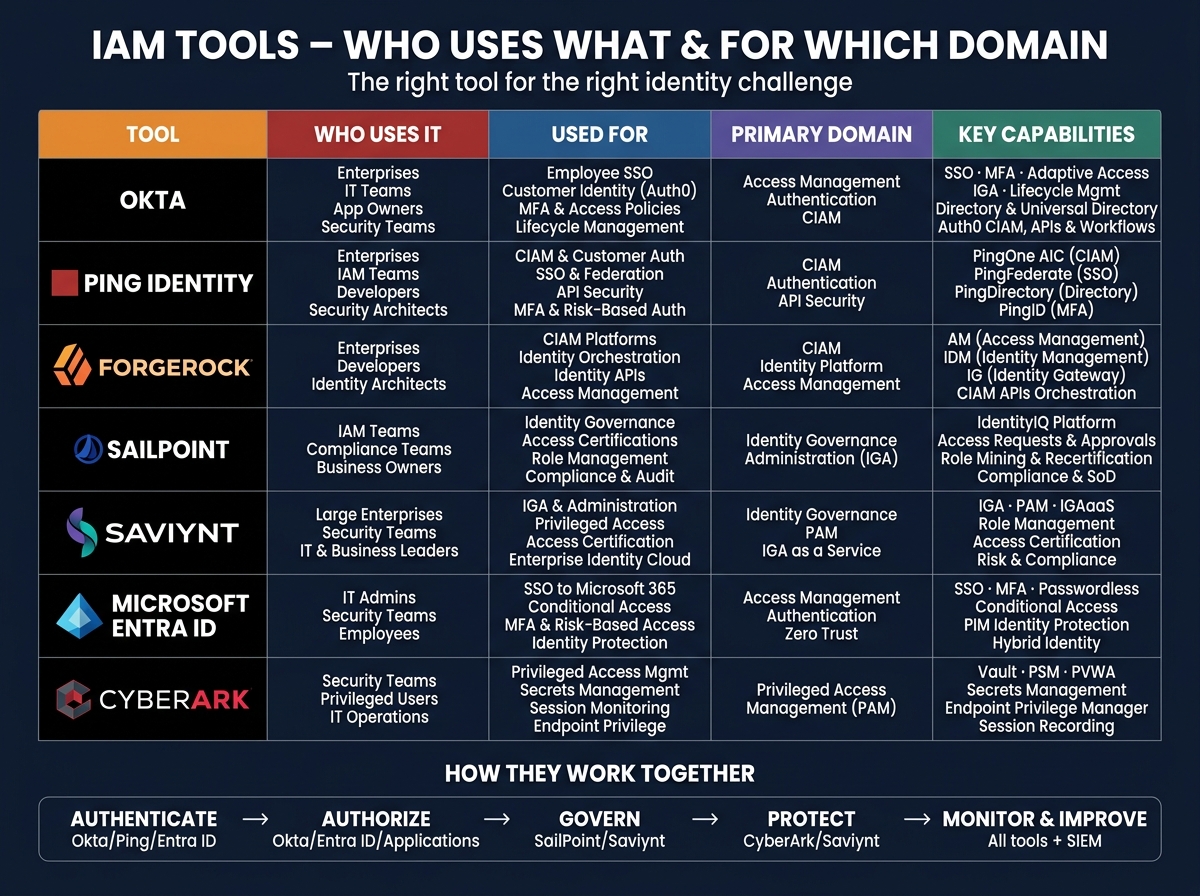
🔑 Access Management & SSO Platforms
- Okta — Market leader for workforce SSO, MFA, and Customer Identity (CIAM via Auth0). Universal Directory, lifecycle management, and adaptive access policies. Used by: Enterprises, IT Teams, App Owners.
- Ping Identity — Strong in enterprise federation (PingFederate), CIAM (PingOne AIC), and API security (PingAccess). PingID adds MFA. Used by: Enterprises, IAM Teams, Security Architects.
- Microsoft Entra ID — Native Azure/Microsoft 365 identity. Conditional Access, PIM (Privileged Identity Management), SSPR, passwordless. Zero Trust backbone for Microsoft-centric orgs.
- ForgeRock — Full CIAM platform with Identity Orchestration, AM (Access Management), IDM (Identity Management), and IG (Identity Gateway). Acquired by Ping Identity in 2023.
📋 IGA & PAM Platforms
- SailPoint — IGA leader. IdentityIQ (on-prem) and IdentityNow (SaaS cloud-native). Access Certifications, Role Mining & Recertification, SoD controls. Compliance-focused (SOX, HIPAA). Used by: IAM Teams, Compliance Teams.
- Saviynt — Converged IGA + PAM platform. IGAaaS, Risk & Compliance, Access Certification, and Enterprise Identity Cloud. Strong for cloud workload governance. Used by: Large Enterprises, Security Teams.
- CyberArk — PAM market leader. Password Vault (PSM), Secrets Management, Endpoint Privilege Manager, Session Recording & Monitoring. Zero Standing Privileges model. Used by: Security Teams, Privileged Users, IT Operations.
Okta / Ping / Entra ID
Okta / Entra ID / Apps
SailPoint / Saviynt
CyberArk / Saviynt
All Tools + SIEM
How IAM Tools Work Together
These tools solve different identity challenges but work together to build a secure, scalable, and intelligent identity ecosystem.
Interview Q&A
What is the difference between RBAC and ABAC?
RBAC (Role-Based Access Control) assigns permissions based on predefined roles (e.g., 'Admin', 'Editor', 'Viewer'). It's simple, well-understood, but can lead to role explosion. ABAC (Attribute-Based Access Control) evaluates attributes (user department, resource classification, time of day, location) against policies to make dynamic access decisions. ABAC is more flexible and granular — e.g., 'allow access if user.department == resource.owner AND time is business hours AND location is corporate network'. Best practice: use RBAC for broad permissions and layer ABAC for fine-grained context-aware access.
How would you implement least privilege access in a large organization?
1) Map all identities (human and non-human).
2Implement RBAC aligned to job functions with regular access reviews.
3Use PAM for privileged accounts with JIT access.
4Enable permission boundaries and SCPs in cloud.
5Automate provisioning/de-provisioning via IGA platform.
6Run access certification campaigns quarterly.
7Monitor for permission drift and anomalous access patterns.
8Implement entitlement analytics to flag excess permissions.
Explain the difference between OAuth 2.0 and OpenID Connect.
OAuth 2.0 is an AUTHORIZATION framework — it allows apps to access resources on behalf of a user but does NOT authenticate the user. OIDC (OpenID Connect) is an AUTHENTICATION layer built on top of OAuth 2.0 — it adds an ID Token (JWT with user identity claims like sub, name, email) and a UserInfo endpoint. Think of it this way: OAuth answers 'what can this app access?'; OIDC answers 'who is this user?'. When you see 'Sign in with Google', that's OIDC. The access token grants API access; the ID token proves identity.
What are JWT security best practices and common attacks?
Best practices:
1Use asymmetric signing (RS256/ES
2
5
6over symmetric (HS
2
5
6for distributed systems.
2Always validate: signature, expiration (exp), issuer (iss), audience (aud).
3Keep access tokens short-lived (5-15 min).
4Never store JWTs in localStorage (XSS vulnerable) — use httpOnly cookies.
5Implement token revocation via blocklist for logout. Common attacks: alg:none attack (set algorithm to none, bypass signature — always whitelist allowed algorithms server-side), key confusion (tricking RS256 validation into using HS256 with public key as secret), token theft via XSS, and expired token replay. Defense: always validate on the server, never trust client-side validation.
How would you design a phishing-resistant MFA strategy?
Phishing-resistant MFA eliminates methods that can be intercepted or replayed in real-time phishing:
1Deploy FIDO2/WebAuthn (YubiKeys or passkeys) as primary MFA — the authenticator verifies the origin URL, so credentials cannot be replayed on phishing sites.
2Disable SMS OTP (SIM swap risk) and email OTP.
3If using push notifications, require number matching (user must enter displayed number) to prevent MFA fatigue attacks (like Uber 2022 breach).
4Implement Conditional Access: require stronger MFA for high-risk actions (admin operations, financial transactions).
5Use certificate-based authentication for managed devices.
6Enable Continuous Access Evaluation (CAE) — revoke sessions immediately when risk signals change (impossible travel, compromised credential detected).
Compare RBAC, ABAC, and ReBAC. When would you use each?
RBAC (Role-Based): Permissions tied to roles (Admin, Editor, Viewer). Simple, auditable, great for most apps. Weakness: role explosion in large orgs with many permission combinations. Use for: standard enterprise apps, well-defined job functions. ABAC (Attribute-Based): Dynamic policies using attributes — 'allow if user.department == finance AND resource.classification == internal AND time is business_hours'. Highly flexible, handles complex scenarios. Weakness: policy complexity, harder to audit. Use for: healthcare (HIPAA), financial services, government. ReBAC (Relationship-Based): Access based on entity relationships in a graph — 'user is owner of document' or 'user is member of team that owns project'. Inspired by Google Zanzibar. Use for: document sharing (Google Drive), social platforms, SaaS multi-tenancy. In practice: start with RBAC, layer ABAC for context-aware decisions, consider ReBAC for hierarchical resource sharing.
Explain the difference between IAM, IGA, and PAM — how do they work together in enterprise identity security?
Three pillars, each answering a different question: IAM (Identity & Access Management) — 'Who can access?' Handles authentication (MFA, SSO, passwordless), user provisioning (joiner-mover-leaver lifecycle), and role-based access control. The day-to-day foundation. IGA (Identity Governance & Administration) — 'Should they access?' Governs and audits access. Runs access certification campaigns, enforces Segregation of Duties (SoD), generates compliance reports (SOX, HIPAA, PCI-DSS). Makes sure access stays appropriate over time. PAM (Privileged Access Management) — 'How do we secure the most sensitive access?' Protects admin/root/superuser accounts with password vaulting, session recording, Just-In-Time (JIT) elevation, and zero standing privileges. How they integrate: IAM manages access → IGA governs and certifies it → PAM locks down privileged accounts. Industry adoption: only 23% of organizations have all three. 41% have IAM only — a significant gap. The converged stack is the ideal mature state.
What are the top challenges when implementing IAM, IGA, and PAM together?
4 major challenges:
1Integration Complexity — IAM (Okta/Azure AD), IGA (SailPoint/Saviynt), and PAM (CyberArk/Delinea) are often separate products from different vendors. Integrating them requires APIs, SCIM connectors, and careful data flow design.
2User Adoption — users resist MFA, access reviews feel bureaucratic, developers resist password vaults for service accounts. Requires change management and executive sponsorship.
3Compliance Hurdles — SOX requires quarterly access certifications, HIPAA requires audit trails, PCI-DSS requires logging of all privileged access. Mapping controls across all three platforms is complex.
4Non-Human Identities — service accounts, API keys, machine identities, and cloud workload identities often outnumber human identities 10:1 but are poorly governed. Modern approach: converged platforms (CyberArk Identity, Saviynt) that unify IGA + PAM, and AI-driven access recommendations to reduce manual review burden.
How would you choose the right IAM vendor tool for a given use case? Compare Okta, SailPoint, CyberArk, and Microsoft Entra ID.
Vendor selection depends on the identity problem being solved:
1WORKFORCE SSO & MFA → Okta or Microsoft Entra ID. Okta is vendor-agnostic and excels at multi-cloud SSO; Entra ID is the natural choice for Microsoft 365-centric organizations with native Conditional Access and PIM.
2CUSTOMER IDENTITY (CIAM) → Okta (Auth0), Ping Identity (PingOne AIC), or ForgeRock. These handle millions of consumer identities with self-service registration, social login, and consent management.
3IDENTITY GOVERNANCE (IGA) → SailPoint IdentityNow (cloud-native, AI-driven) or Saviynt (converged IGA+PAM). Use when you need access certifications, SoD enforcement, and compliance reporting (SOX, HIPAA).
4PRIVILEGED ACCESS (PAM) → CyberArk (market leader for enterprise PAM — password vaulting, session recording, secrets management) or Saviynt (converged IGA+PAM for cloud-first orgs). Key interview point: there is NO single vendor that does everything best. Mature enterprises layer Okta/Entra ID (IAM) + SailPoint/Saviynt (IGA) + CyberArk (PAM). Only 23% of organizations have all three — the rest have significant identity security gaps.
Framework Mapping
| Framework | Relevant Controls |
|---|---|
| NIST | SP 800-63 (Digital Identity), SP 800-53 AC (Access Control), IA (Identification & Authentication) |
| ISO | A.9 (Access Control), A.9.2 (User Access Mgmt), A.9.4 (System Access Control) |
| OWASP | A01 (Broken Access Control), A07 (Identification & Authentication Failures) |
| GDPR | Art. 5 (Processing Principles), Art. 25 (Privacy by Design), Art. 32 (Security of Processing) |